

ERP and industry solutions
Map finance and operations, validate construction or manufacturing workflows, prepare data and test the processes that connect teams. Confirm opening balances and operational readiness where relevant.
Whether you are improving your ERP, modernizing Microsoft 365, connecting applications, implementing CRM or automating work, we start with your business priorities and the people who use your systems. We agree on outcomes, validate the solution with your team and support the transition into everyday use.
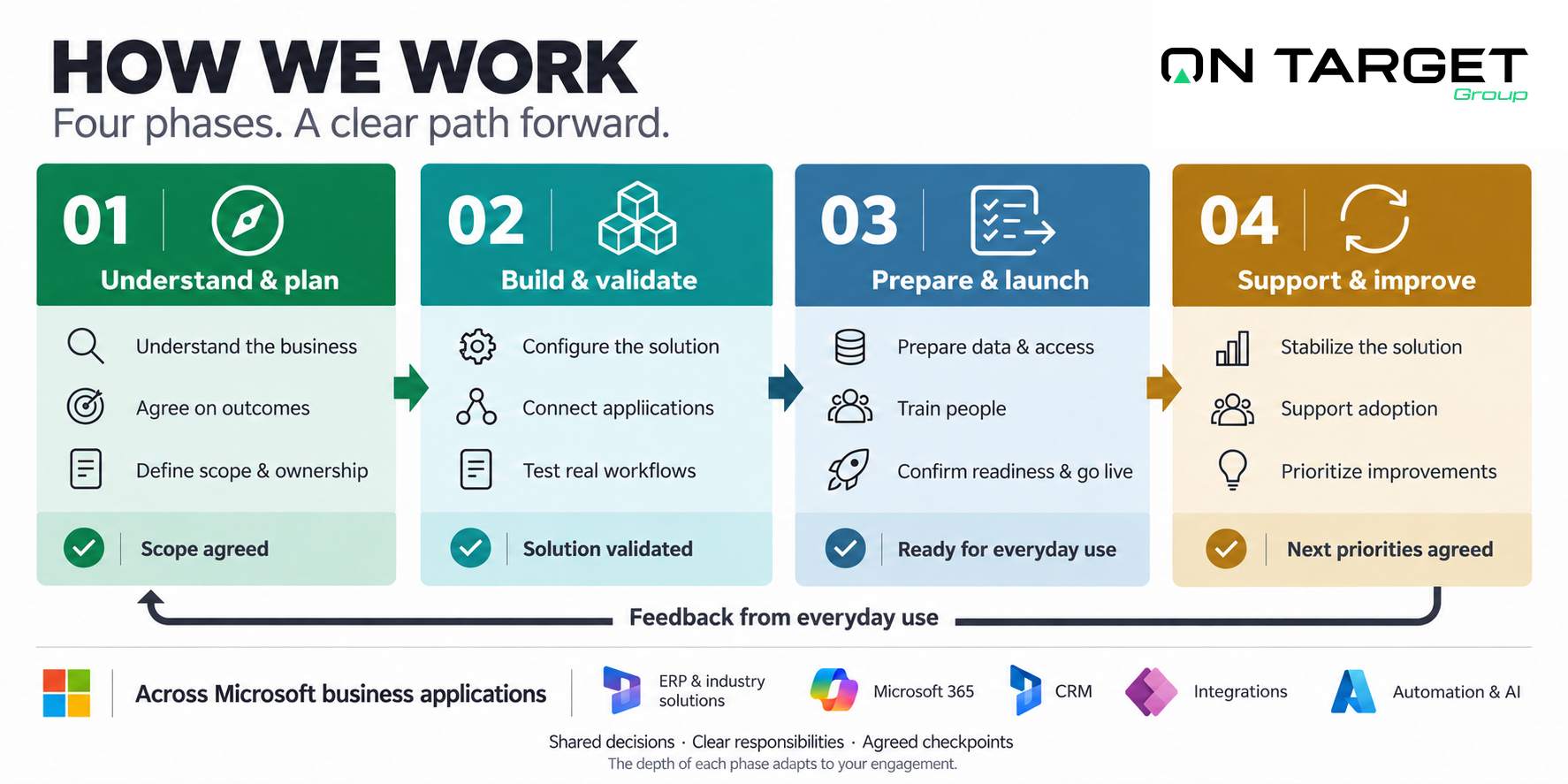
We adapt the depth of each phase to your engagement, whether it is a focused improvement or a wider deployment. Together we agree on the deliverables, responsibilities and checkpoints that matter for your project. Explore the activities below when you need more detail.
Understand your business, agree on outcomes and define the scope.
Understand how people, processes, information and systems work together.
Your role: Bring the relevant teams and examples of everyday tasks.
Checkpoint: The current process and main constraints are documented.
Agree the operational outcomes and how success will be evaluated.
Your role: Prioritize the results and name the decision owners.
Checkpoint: Outcomes and measurable acceptance criteria are agreed.
Define the target design, deliverables, dependencies and exclusions.
Your role: Review responsibilities, assumptions and change decisions.
Checkpoint: The scope and implementation sequence are approved.
Configure, integrate and test the solution against real work.
Configure the solution, build agreed components and test realistic workflows.
Your role: Test with process owners and decide on design questions.
Checkpoint: Agreed scenarios work in the test environment.
Prepare data, train people and move into everyday use.
Prepare data, content, identities and access; migrate what the engagement requires.
Your role: Confirm data ownership, access needs and any information to transfer.
Checkpoint: Required data, content and access checks are approved; migrations are reconciled where applicable.
Prepare people for their actual tasks and support procedures.
Your role: Provide role-based users and time for practical exercises.
Checkpoint: Users complete the agreed role-specific tasks.
Execute the agreed cutover, checks and escalation plan.
Your role: Confirm readiness, operating windows and go/no-go authority.
Checkpoint: Critical workflows, access and agreed release checks are validated.
Stabilize the solution, support adoption and prioritize improvements.
Resolve issues, support users and monitor the solution during its initial use.
Your role: Log issues, assign priorities and validate corrections.
Checkpoint: Critical issues and ongoing support ownership are reviewed.
Prioritize enhancements, automation and reporting after stabilization.
Your role: Review adoption and select the next business priorities.
Checkpoint: An improvement backlog and review cadence are agreed.
The framework stays consistent. The work, evidence and readiness checks change with the systems and people involved.
Map finance and operations, validate construction or manufacturing workflows, prepare data and test the processes that connect teams. Confirm opening balances and operational readiness where relevant.
Assess identities, permissions, collaboration and information governance. Plan tenant consolidation or workplace changes around access, content validation, continuity and user adoption.
Define sales and service processes, customer data ownership and team responsibilities. Validate representative customer journeys and prepare users for their day-to-day roles.
Agree which system owns each record, what should move between applications and how errors are handled. Test complete exchanges, permissions and monitoring before release.
Choose a useful workflow, check data quality and access, and define approvals and human oversight. Start with a bounded pilot and evaluate its usefulness before expanding.
An ERP deployment, Microsoft 365 migration, CRM rollout or integration can lose momentum when scope, data, ownership or technical dependencies remain unresolved. We review what is in place with your team, identify the blockers and agree on a realistic next step.
A practical path through ERP recovery
Our recovery work starts with the operation: review the current system, identify what prevents daily use, and agree on priorities, responsibilities and acceptance criteria before the next implementation stage.
Read the Cycles Devinci case studyReview the agreed goals, configuration, data, access, integrations and outstanding decisions. Identify what can be retained, what needs correction and what still needs validation.
Focus on essential workflows and dependencies. Set a workable scope, assign owners and define the evidence needed to approve the next milestone.
Coordinate any handover, test the agreed changes and prepare users and support teams. Review progress against acceptance criteria and adjust the plan as issues are resolved.
Explore client situations, delivery milestones and lessons from implementation.
Meet the people responsible for turning the plan into working systems.
Tell us what you want to improve, which systems are involved and what constraints matter. We’ll discuss the scope, people and delivery approach your engagement needs.