
Connect Business Central, Dynamics 365 and Power Platform.
OnTarget designs integrations between Microsoft business applications so customer, project and operational data can move between systems without repeated manual entry. Integration work includes mapping records, deciding which system owns each field, handling failures and defining who supports the connection.
Define an integration that your teams can operate
How does integration differ from a CRM implementation?
Integration connects records and actions between applications. A CRM implementation designs how sales and service teams work inside their customer system. The projects may overlap, but integration also needs clear ownership of shared records, error handling and monitoring across both systems.
What is a useful integration scenario?
For example, an approved CRM opportunity can start an order in Business Central, while a Power App records field activity. Before automation, define customer and item identifiers, the approval event, required fields and which system may update each record. The supported flow is confirmed during design.
What happens when data cannot be transferred?
Plan validation rules, duplicate detection, retry behavior, a visible exception queue and a responsible owner. Reconcile source and destination records during testing. Permissions, API limits and the capabilities of each connector can constrain the design.
What determines delivery effort?
The number of systems and flows, data quality, transaction volume, security boundaries and custom logic determine scope. Deliverables should identify mappings, test cases, monitoring, documentation and post-launch support responsibilities. Licensing and ongoing operating costs are reviewed separately.
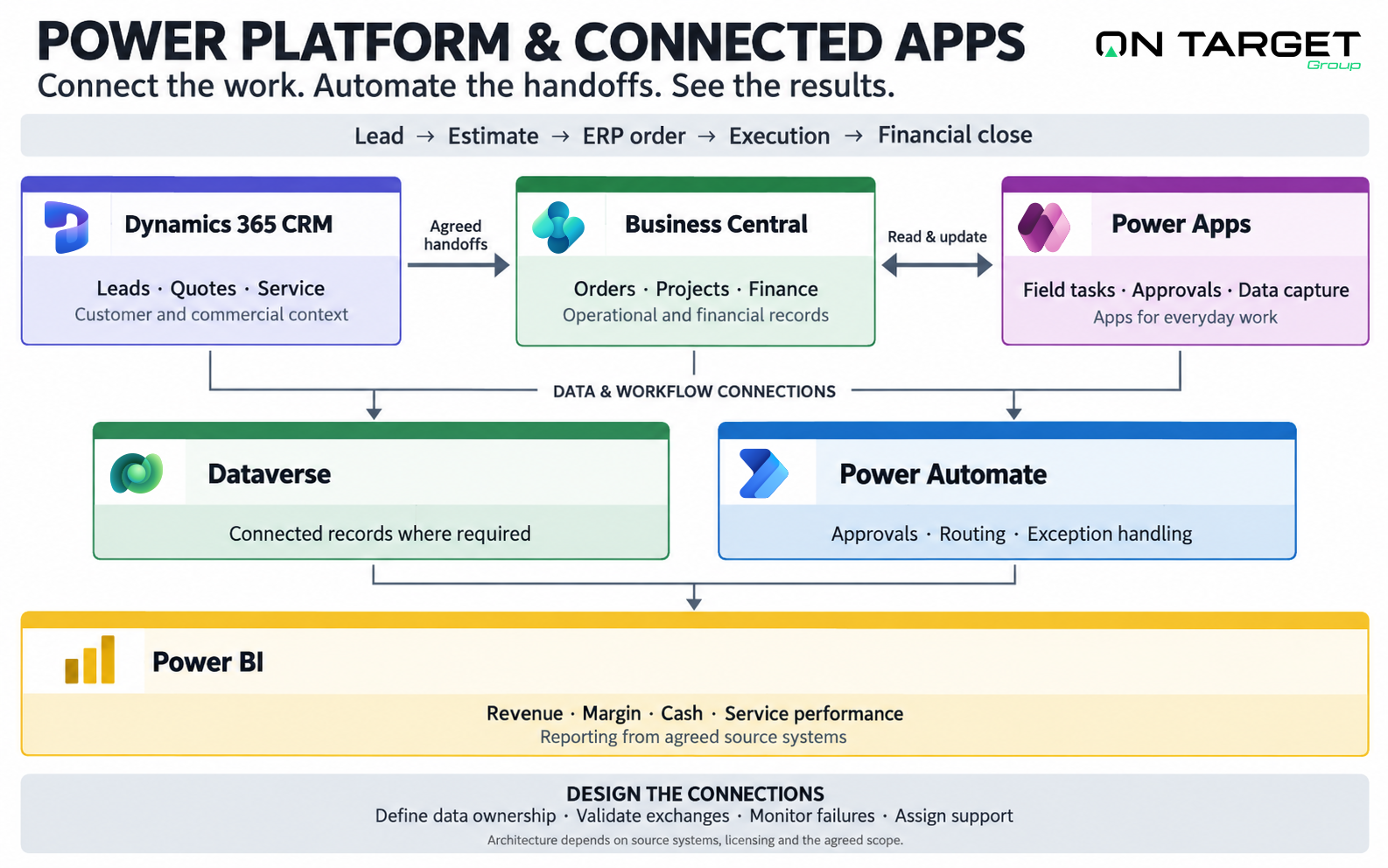
Lead → Estimate → ERP Order → Execution → Financial Close
Instead of forcing your staff to manually copy and paste details between different portals, we engineer Dataverse pipelines and automated workflows that pass context cleanly across every step of your operation.
Dynamics 365 Sales & Customer Service
Synchronize client accounts, contract rates, and customer support tickets directly with your Business Central ledger without disconnected CRM islands.
Power Apps (Low-Code Mobile & Tablet)
Build applications for approvals, service requests, field work and everyday business tasks, connected to the records your teams rely on.
Power Automate (Process Automation)
Replace repetitive manual approvals, email attachment routing, and invoice verification with automated cloud and desktop RPA workflows.
Power BI (Unified Operational Reporting)
Build executive dashboards that bring together financial results, sales performance, service activity and operational measures from your business systems.
Start with the systems your people use.
Bring collaboration, documents and identity into the integration conversation.
Explore the sales and service processes your connected apps can support.
Give connected data a clear executive purpose.
Turn the information flowing across your applications into focused Power BI dashboards for performance reviews, exceptions and action.
Eliminate double data entry across your business systems.
Speak directly with our solutions architects about connecting your Business Central, CRM, and Power Platform workflows.