
Microsoft 365 consolidation, governance and Copilot readiness.
OnTarget helps businesses consolidate Microsoft 365 tenants after acquisitions, migrate files to SharePoint, organize Teams and review identity and access controls. Copilot readiness starts with the information users can access: ownership, permissions, sensitivity and retention need attention before a pilot rollout.
Prepare a Microsoft 365 consolidation or governance project
What is tenant consolidation?
A Microsoft 365 tenant is an organization’s identity and service environment. Consolidation brings selected users, domains and content from multiple tenants into an agreed destination. Mail, OneDrive, SharePoint, Teams, guest access and applications have different migration constraints that need to be reviewed.
What information is needed first?
Inventory tenants, domains, users, licenses, mailboxes, sites, storage, applications and external sharing. Identify owners and retention obligations. A dependency and access review helps define migration waves, communications, interruption windows and rollback decisions.
Does preparing Copilot mean buying licenses?
Licenses are only one part. Start by reviewing permissions, sensitive information, content ownership and the intended use cases. Validate access with a controlled pilot, train users to check answers and establish who investigates inappropriate exposure or unreliable output.
What are the deliverables and cost drivers?
The agreed scope can include an environment assessment, target design, migration plan, access policies, pilot and handover. Volume, identity complexity, source systems, governance requirements and coexistence needs affect effort. Compliance obligations remain the organization’s responsibility; the project implements agreed controls.
Turn collaboration into connected work.
Extend Teams and SharePoint with business apps and approval workflows.
See how we plan changes, prepare users and support adoption.
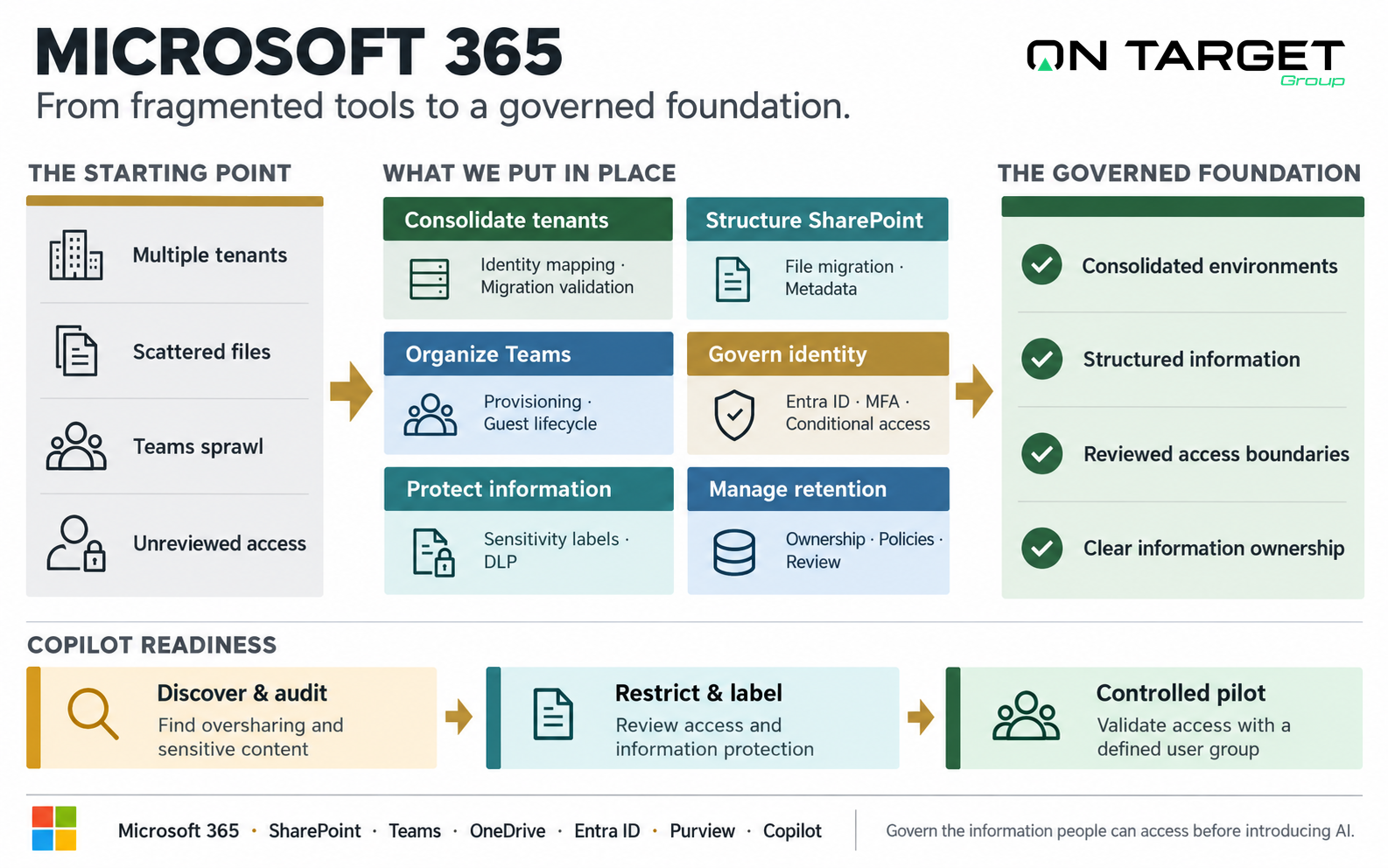
From unmanaged technical debt to governed operational structure.
- •Multiple Tenants: 2–4 separate tenants after company acquisitions with confusing cross-domain email forwarding.
- •File Duplication: Crucial documents scattered across personal OneDrive folders, legacy server Z: drives, and Teams channels.
- •Open Guest Access: Hundreds of anonymous sharing links and external guests with unrevoked access to company IP.
- •Copilot Blocked: Management cannot deploy Microsoft 365 Copilot because it would expose unpermissioned executive salaries.
 OnTarget Modernized Architecture
- ✓Single Tenant Harmony: Consolidated identity, single global address list, and unified licensing optimization.
- ✓Structured Information: Clean SharePoint hub sites organized by department and business process, not arbitrary user folders.
- ✓Zero-Trust Controls: Enforced MFA, conditional device access, and automatic expiration for external vendor collaboration.
- ✓AI-Ready Foundation: Verified access boundaries allow safe, high-value deployment of Microsoft 365 Copilot.
Practical solutions to real Microsoft technical challenges.
We explain every migration and governance project in clear business terms, not obscure Microsoft licensing acronyms.
Tenant Consolidation & Mergers
Consolidate Microsoft 365 environments after an acquisition. Plan mailbox, OneDrive, Teams and SharePoint migrations with identity mapping, access checks and validation of the content each migration tool supports.
SharePoint & File-Share Migration
Replace decaying on-premise Windows network file shares (Z: drives) with structured, searchable SharePoint hubs governed by clean metadata and sensitivity labels.
Teams Architecture & Sprawl Control
Stop the proliferation of duplicate, abandoned Teams and channels. Establish automated provisioning templates, external guest lifecycle, and retention policies.
Identity & Conditional Access Governance
Modernize your Entra ID (Azure AD) foundation. Implement risk-based multi-factor authentication (MFA), trusted device policies, and privileged access management.
Copilot & AI Data Readiness
Copilot can only search what users have access to. We audit overshared folders, restrict open links, and apply sensitivity labels before AI exposes sensitive financial records.
Compliance & Retention Engineering
Configure retention, access and information protection controls against the requirements your organization has identified. Validate policies with the people responsible for privacy, records and security.
Why information governance matters for Copilot readiness.
Microsoft Copilot doesn't magically fix bad data structures—it accelerates them. If a junior employee prompts Copilot with "What is the executive bonus structure for this fiscal year?", Copilot will read any unindexed Excel file sitting on an improperly configured SharePoint site and summarize it in seconds.
Scan all SharePoint sites and Teams files for company-wide link exposure and high-risk sensitive assets.
Implement Microsoft Purview sensitivity labels (Confidential, Internal, Public) with auto-encryption rules.
Deploy Copilot licenses to a controlled operational pilot group with verified role-based access gates.
Get an honest assessment of your Microsoft 365 tenant.
Speak directly with our cloud architecture leads to review tenant consolidation, file migrations, or Copilot data security.