
Dynamics 365 CRM implementation and Business Central integration.
OnTarget helps organizations plan and implement Dynamics 365 Sales, Customer Service and Field Service with connections to Business Central and Microsoft 365. We define customer records, sales and service processes, data migration and role-based training so the CRM fits the work your teams actually do.
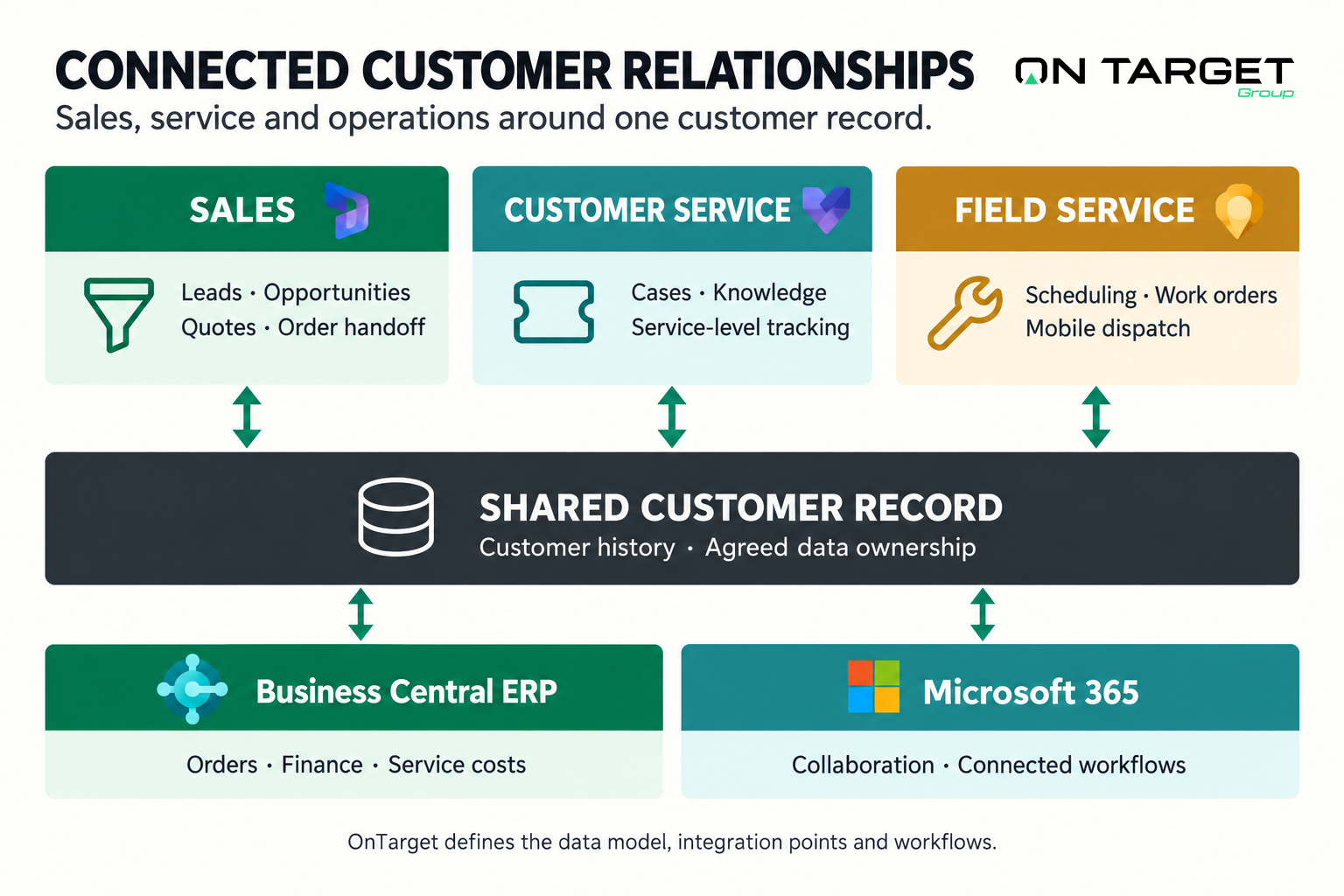
Plan CRM around sales and service work
Which Dynamics 365 applications fit the requirement?
Sales supports accounts, opportunities and the sales process. Customer Service supports cases, knowledge and service workflows. Field Service supports work orders and on-site service planning. Select the applications from the actual roles, customer journey and integration requirements rather than assuming one license covers everything.
What should connect to Business Central?
Agree where customer identities, quotes, orders, prices, service costs and financial status belong. Define the specific records and events to exchange, who may change them and how errors are resolved. Not every field needs to be synchronized in both directions.
What does implementation include?
The agreed scope can cover process design, configuration, data cleanup and migration, integration, permissions, testing, training and adoption support. Your sales and service owners validate the workflow and data; the project team implements the design and documents support ownership.
What affects budget and adoption?
Application choice, users, data condition, custom workflows, integrations and reporting needs shape effort and licensing. Test representative selling or service scenarios with real users, define required data and responsibilities, and review adoption after launch instead of treating configuration as completion.
One customer record, across sales, service, and operations.

The value of Dynamics 365 CRM is not the CRM alone — it is the connection to the rest of the Microsoft environment. OnTarget scopes the data model, the integration points, and the workflows that make CRM part of one business system.
Dynamics 365 Sales
Lead-to-cash with quotes, opportunity pipeline, and order handoff into Business Central — without rekeying.
Dynamics 365 Customer Service
Case management, knowledge articles, and service-level tracking connected to customer history in ERP.
Dynamics 365 Field Service
Scheduling, work orders, and mobile dispatch for service teams, with cost recovery posted back to finance.
Carry the customer relationship beyond CRM.
Connect sales commitments with orders, invoicing and financial operations.
Automate handoffs and connect customer information across applications.
Connect commercial activity to business performance.
Bring pipeline, sales and service measures into a leadership view. Align customer and financial records before combining CRM and ERP reporting.
Connect CRM to your ERP and operations.
Tell us where your customer data lives today and where it needs to go.
Discuss your project